
Stop Retyping: Handwritten Documents to Actionable Data
Stop Retyping: Handwritten Documents to Actionable Data
The Hidden Cost of Handwritten Documents
Handwritten documents never really went away. Patient intake forms, field inspection reports, signed contracts, loan applications, warehouse logs — they pile up fast. And for most organizations, someone still has to read each one and manually key the data into a system.
That cost adds up. Manual data entry errors affect roughly 1 in 300 keystrokes, and a single bad record can ripple through billing systems, compliance reports, and customer files. [1] When you multiply that error rate across thousands of documents per month, the business impact is significant — in labor hours, rework, and risk exposure.
This is exactly the problem that Outcome Cloud, the intelligent document processing platform from MaxxLogix, is built to solve.
Why Handwriting Is Hard for Traditional OCR
Standard optical character recognition (OCR) technology has handled printed text reasonably well for decades. But handwriting is a different challenge entirely. Letter shapes vary by person, ink pressure differs, words run together, and abbreviations are inconsistent. Traditional OCR tools struggle here — industry studies show that general OCR accuracy on handwritten text can drop to 75–85%, far below what enterprise workflows require. [2]
Outcome Cloud™ goes beyond traditional OCR. IDP Outcomes™ brings together AI, LLMs, and intelligent AWS services to classify information, extract meaningful data, and put that information into business context—so it can drive workflows, decisions, and business outcomes.
How Outcome Cloud Extracts Key Data From Handwritten Forms
The workflow is straightforward, even when the documents are not.
1. Ingest: Documents arrive via scanner, mobile capture, email attachment, or direct upload. Outcome Cloud accepts multiple file types including PDF, TIFF, and JPEG, so your team does not need to change how they collect documents.
2. Classify: The platform identifies the document type automatically. A handwritten property inspection report is treated differently from a signed patient consent form. Classification drives what data fields the system looks for next.
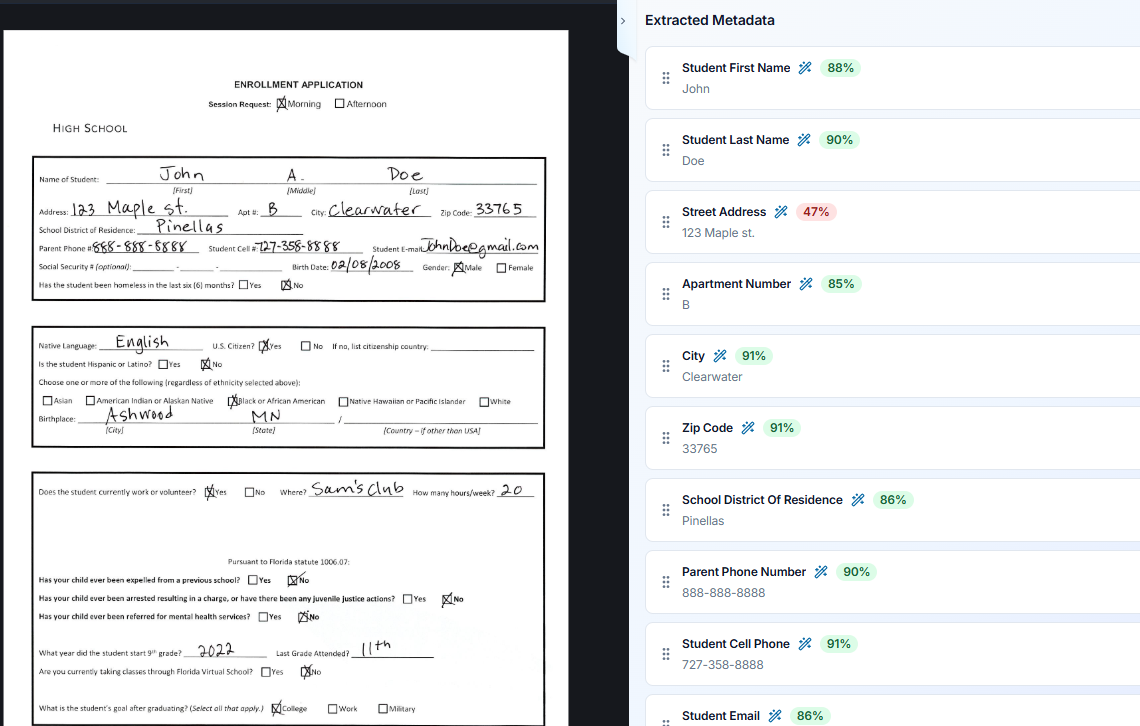
3. Extract: Using IDP models trained on domain-specific handwriting patterns, Outcome Cloud locates and pulls the key data fields your workflow needs — names, dates, amounts, addresses, checkboxes, signatures, and free-text notes.
4. Validate: Extracted values are checked against business rules and existing records. If a date is ambiguous or a value falls outside an expected range, the system flags it for human review rather than silently passing bad data downstream.
5. Deliver: Clean, structured data moves directly into your ERP, CRM, document management system, or custom database via API or pre-built connector — no copy-paste, no re-keying.
Real Use Cases Across Industries
The value of automated handwriting extraction shows up across a wide range of industries.
Healthcare organizations process millions of handwritten forms annually. Studies estimate that 86% of medical errors are administrative in nature, and many trace back to manual data transcription. [3] Automating intake forms and clinical notes reduces that exposure directly.
Financial services firms deal with signed paper applications, wire transfer requests, and loan documents. The global cost of poor data quality is estimated at $12.9 million per year for the average organization, according to Gartner. [4] Reducing manual entry on handwritten financial documents is one of the fastest paths to cutting that number.
Logistics and field operations teams generate handwritten delivery receipts, inspection checklists, and maintenance logs daily. Getting that data into a system quickly improves inventory accuracy, SLA tracking, and compliance documentation.
Legal and compliance teams handle signed agreements, discovery documents, and regulatory filings. Automated extraction with a full audit trail supports defensible recordkeeping without adding headcount.
Security and Compliance Built In
Extracting sensitive data from documents creates its own compliance obligations. Outcome Cloud is designed with enterprise security requirements in mind — including role-based access controls, data encryption at rest and in transit, and audit logging that supports frameworks like HIPAA, SOC 2, and GDPR. [5] Your extracted data stays protected through every step of the pipeline.
The Business Case Is Straightforward
Organizations that automate document-heavy workflows report significant reductions in processing time and cost. McKinsey research found that data entry and document processing are among the highest-value targets for intelligent automation, with potential efficiency gains exceeding 60–70% in document-intensive back-office functions. [6]
With Outcome Cloud, the transition from paper to structured data does not require a lengthy implementation or a team of data scientists. The platform is built for enterprise deployment with configurable models, meaning it adapts to your documents — not the other way around.
If handwritten forms are slowing your team down or creating compliance gaps, it is worth a closer look. Reach out to the MaxxLogix team for a personalized demo of Outcome Cloud and see how your specific document types can be handled at scale.
Sources
[1] MIT Sloan Management Review
[2] AIIM (Association for Intelligent Information Management)
[3] Journal of Patient Safety / NIH
[4] Gartner
[5] MaxxLogix Outcome Cloud Platform Documentation
[6] McKinsey Global Institute